
CBDF Specification: Document Structure
Version 1.1 (Phase II)Document: 01-Document-Structure • Date: 2026-07-13
1. Overview
A CBDF document is a binary file divided into five major sections, separated by FS (0x1C) markers. Core sections are identified by position, not by a per-section file-ID byte.
[Meta] FS [Styles] FS [Text] FS [Resources] FS [Logic]
[ optional: FS [SectionID:1][Len:4 LE][payload] ... ]
Text precedes Resources to enable abortable downloads: clients can stop after text without receiving image data. All multi-byte integers are little-endian.
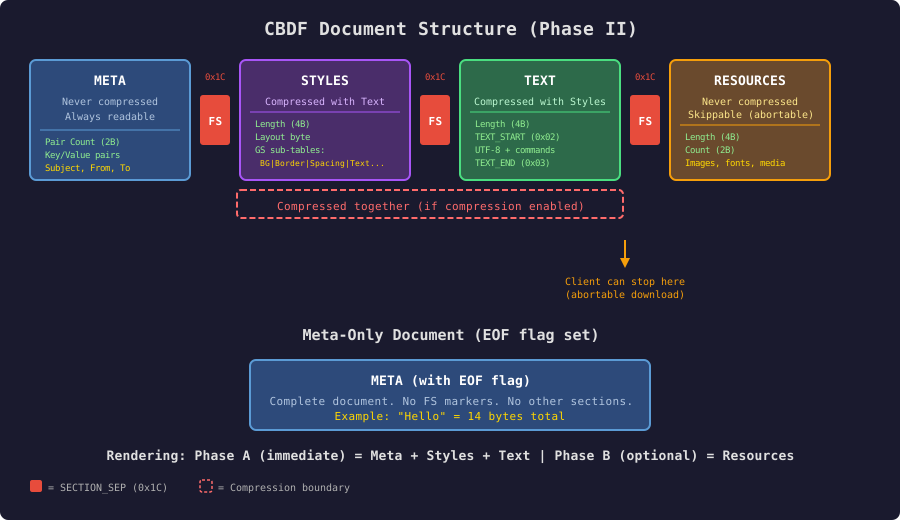
Click diagram to open full size in new tab
2. Section Overview
| # | Section | Length Prefix | Compressed? | Required? | Description |
|---|---|---|---|---|---|
| 1 | Meta | No (KV pairs) | Never | Yes | Document envelope |
| 2 | Styles | 4 bytes LE | Yes* | Yes** | LayoutID + style tables |
| 3 | Text | 4 bytes LE | Yes* | Yes** | UTF-8 + control codes |
| 4 | Resources | 4 bytes LE | Never | Slot yes; payload may be empty | Images, fonts, etc. |
| 5 | Logic | 4 bytes LE | — | Slot yes; length 0 in Phase II | Executable (Phase III) |
Notes
* Styles and Text compress together when Meta key 31 is non-zero.
** May be zero-length but FS markers and length fields are present in Phase II (except meta-only documents). Canonical encoders always emit Resources and Logic tails.
3. Phase I Structure (backward compatible)
[Pair Count: 2 bytes LE] [Meta KV pairs]
0x1C
0x1C
0x02 [Plain text body] EOF
No Meta key 30 (version 0). Empty styles implied by consecutive FS. No Resources/Logic. Body starts with STX and continues until EOF. ETX is not required. Implemented by qmail_cbdf.c.
Do not add a leading magic byte before the pair count — that breaks deployed Phase I files.
4. Phase II Structure
4A. Uncompressed (version ≥ 1)
[Pair Count: 2 LE] [Meta KV pairs including key 30 = 1]
0x1C [StylesLen:4 LE] [Styles bytes]
0x1C [TextLen:4 LE] [STX ... markup ... ETX]
0x1C [ResourcesLen:4 LE] [Resource blobs]
0x1C [LogicLen:4 LE]          ; must be 0 in Phase II
The 4-byte length appears after FS and is not included in the length value. Length counts only section payload bytes.
FS [Length=N: 4 bytes LE] [N bytes of section data]Empty tails (canonical encode): always emit Resources and Logic as FS + 0x00000000 when empty (10 bytes total). Fixed state machine for parsers.
Lenient decode: parsers MAY accept EOF immediately after a valid Text section and treat Resources/Logic as empty. New encoders MUST NOT rely on that shortcut.
Non-zero Logic in a version-1 document: hard-fail until Phase III defines Logic.
4A2. Compressed (key 31 ∈ {1..4})
[Meta]
0x1C [CompLen:4 LE] [DecompLen:4 LE] [compressed data]
0x1C [ResourcesLen:4 LE] [Resources]
0x1C [LogicLen:4 LE = 0]
After decompression, the blob MUST contain:
[StylesLen:4 LE] [Styles]
0x1C
[TextLen:4 LE] [STX ... ETX]
The FS between Styles and Text is inside the compressed blob. Meta and Resources are never CBDF-compressed.
4B. Meta-only (key 33 = 1)
[Pair Count: 2 LE] [Meta KV pairs including Version and EOF flag]
; no FS markers follow
Used for ultra-compact notifications and SMS-class messages.
5. QMail Transport Packaging
Do not confuse CBDF logical sections with Tell manifest file types:
| Tell file_type | Content |
|---|---|
| 0 | Private Meta KLV (may end with no trailing FS) |
| 1 | Body/content: FS [Styles] FS [Text] FS [Resources] FS [Logic] |
| 10+ | Attachments |
Phase I body objects begin FS FS STX. Phase II body objects begin FS [styles_len]…. Offsets such as Meta key 40 (Text Offset) are relative to byte 0 of the containing object.
Phase II keeps Resources embedded in file_type=1. Splitting large resources into separate objects (e.g. when total email exceeds ~14,000 bytes ≈ 1,400 B UDP × 10 RAIDA stripes) is a Phase III transport policy.
6. Compression
| Key 31 | Codec | Phase II rule |
|---|---|---|
| 0 | None | Required |
| 1 | DEFLATE/zlib | Mandatory to implement; default encoder output |
| 2 | LZ4 | Optional decode; emit only if peer capability known |
| 3 | Zstandard | Optional decode; emit only if peer capability known |
| 4 | Brotli | Optional decode; emit only if peer capability known |
| 5 | Semantic encoding | Experimental — Phase III; no Phase II implementation requirement |
| 6–255 | Reserved | Reject if required |
Encoders SHOULD skip compression when uncompressed Styles+Text total is less than 256 bytes.
QMail Phase II has no codec negotiation channel: emit zlib or none unless peer support is known out of band.
7. Extension Sections
After Logic, a document MAY contain additional sections:
FS [SectionID:1] [Len:4 LE] [payload]IDs are registry-assigned. Phase II parsers MUST skip unknown IDs by length. Section ID 1 is reserved for a future Phase III Parse Index (optional byte offsets into Text for parallel workers). IDs for Listeners/Relationships land here without a version bump.
8. Byte Order and File Extensions
All multi-byte integers in CBDF are little-endian. (QMail Tell wire fields use big-endian; convert at the boundary.)
| Extension | Meaning |
|---|---|
.qmail | QMail email document |
.qweb | QWeb page document |
.cbdf | Generic CBDF document |
9. Parallel Parsing
CBDF is conducive to coarse-grained parallel work:
- One sequential scan builds a section table from FS + lengths.
- Style sub-tables are packed (count × fixed stride) and indexable after headers are known.
- Resources are length-prefixed blobs; image decode fans out on a thread pool with width/height placeholders from Image definitions.
- LayoutID implies a pane list; paint can parallelize per pane after a serial Text walk.
Serial choke points (accepted): (1) single zlib blob for Styles+Text; (2) Text control stream (style stack and self-delimiting payloads). Recommended pipeline: Meta → decompress → parallel resources + style tables → serial Text → display list → parallel pane paint.
Optional Phase III Parse Index (extension section ID 1) can add seekable Text slices without changing Phase II wire for small documents.
10. Migration
| Document → Client | Phase I client | Phase II client |
|---|---|---|
| v0 | Full | Full (no key 30) |
| v1 | Meta OK; body may fail old FS FS STX check | Full |
| Meta-only | Subject may display | Full |
Product rule: ship a tolerant Phase I decoder before any Phase II encoder. If key 30 ≥ 1 or key 33 = 1, do not demand FS FS STX; show Preview Text / AI Summary / Subject labeled as newer-client content. Phase II encoders SHOULD emit key 36 during the transition era and MUST keep Phase I required keys unchanged.