
CBDF Specification: Styles Section
Version 1.1 (Phase II)Document: 03-Styles-Section • Date: 2026-07-18
1. Overview
The Styles section defines all visual formatting used in the document. It sits between the first FS (end of Meta) and the second FS (start of Text). After the FS marker:
[Length: 4 bytes LE]
[LayoutID: 2 bytes LE]
[Page background: optional BG record | omitted if next byte is GS]
GS [sub-tables...]
The 4-byte length counts section content only (after the length field). If Meta key 32 (Default Style Set) is ≥ 1, the section may be empty of records (LayoutID + empty GS markers, or delta overrides only).
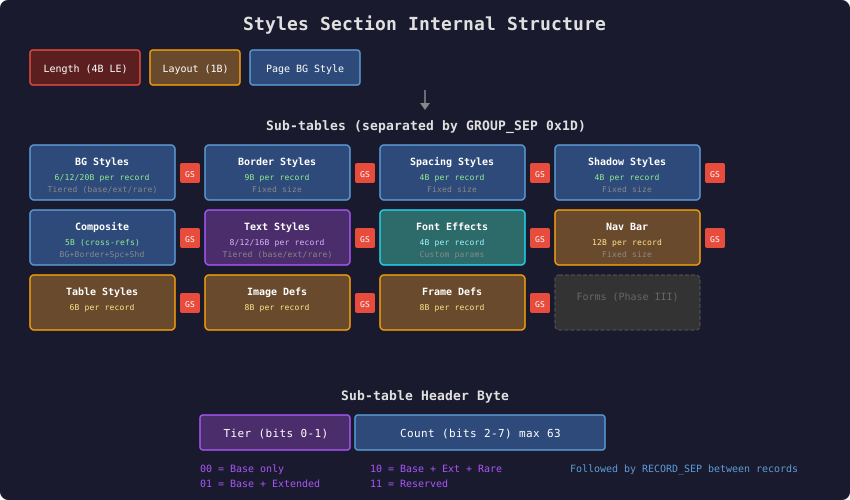
Click diagram to open full size
Layout catalogue (humans + machines): see
10-Layout-Catalogue
and download cbdf-layout-catalog-v1.json.
2. LayoutID (2 bytes LE)
Replaces the Phase II draft 1-byte layout bitfield as the primary layout selector. The client holds a layout catalogue (like the font table): the wire carries only the ID. Each catalogue entry includes a pane index table (which index is header/left/main/right/footer/overlay) and a mobile pair layout id.
| Range | Meaning |
|---|---|
0x0000–0x00FF | Compatibility page: low byte = legacy 1-byte bitfield (panel flags + cols + rows; main always implied). All historical 1-byte examples remain valid as LayoutID = that byte. |
0x0100–0x7FFF | Standard catalogue (registry-governed) |
0x8000–0xEFFF | Domain/application profiles |
0xF000–0xFFFE | Experimental / private — not for interoperable mail |
0xFFFF | Invalid / unknown sentinel |
2A. Legacy bitfield (low byte of compatibility page)
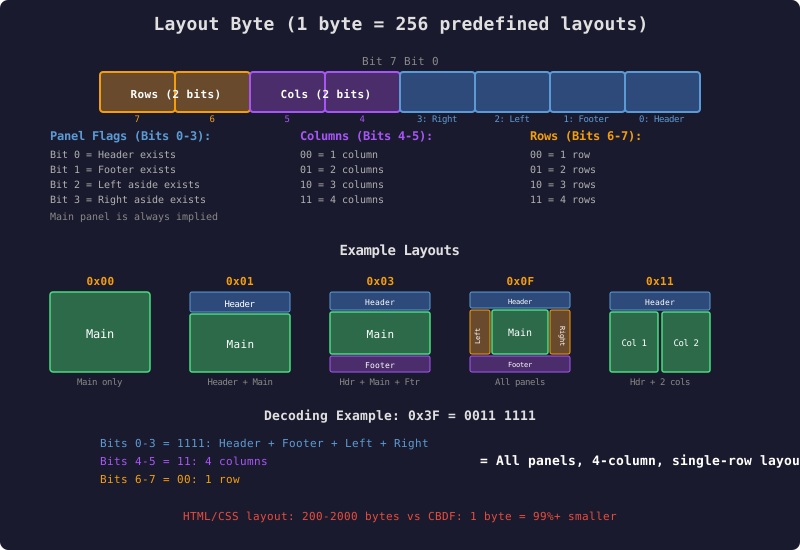
Legacy 1-byte encoding (bits 0–3 panels, 4–5 cols, 6–7 rows) — used when LayoutID is in 0x0000–0x00FF
| Bits | Meaning |
|---|---|
| 0 | Header exists |
| 1 | Footer exists |
| 2 | Left aside exists |
| 3 | Right aside exists |
| 4–5 | Main columns: 00=1, 01=2, 10=3, 11=4 |
| 6–7 | Main rows: 00=1, 01=2, 10=3, 11=4 |
Main is always implied.
2B. Catalogue entries (LayoutID ≥ 0x0100)
Each catalogue entry defines topology and default geometry: pane existence, full-height left/right asides (past header and/or beside footer), centered modal-like islands, grid splits, and default margin/padding/width hints. Fine styling remains in style sub-tables; catalogue metrics are defaults overridden by explicit styles and user themes.
Encoders that require exact catalogue layout fidelity SHOULD set Required Features bit 11 (catalog layout).
2C. Pane index order (canonical)
Every catalogue entry declares a pane index table. Default / general rule:
- Header (if present)
- Left aside (if present)
- Main cells, row-major (left→right, top→bottom)
- Right aside (if present)
- Footer (if present)
Full-height asides keep reading-order position. A centered overlay/island pane indexes last (plain-text extraction after normal flow). Only existing panes consume indices.
2D. Unknown LayoutID
If the client lacks a catalogue entry for the ID, it also lacks that layout's pane index table — it cannot know the pane count, order, or special panes. This is registry version skew, not necessarily corruption. The client's response depends on the encoder's declared intent:
- Required Features bit 11 set (exact catalogue layout required): fail closed — do not attempt a styled render; show the labeled plain-text extraction with a notice that the document requires a newer layout catalogue.
- Bit 11 not set: render as
LayoutID 0x0000(single main flow, content in stream order) with a user-visible notice that the intended layout is unavailable.
Clients MUST implement exactly this policy pair (no silent fallback, no invented pane geometry). Phase II clients implement a small subset of IDs; the number space is reserved.
3. Sub-Table Header Byte
Each sub-table begins with one header byte:
| Bits | Meaning |
|---|---|
| 0–1 | Tier: 00 base, 01 extended, 10 rare, 11 reserved (reject in Phase II) |
| 2–7 | Count 0–63 records |
All records in a sub-table share the same tier (fixed size). Non-tiered tables force tier bits = 00.
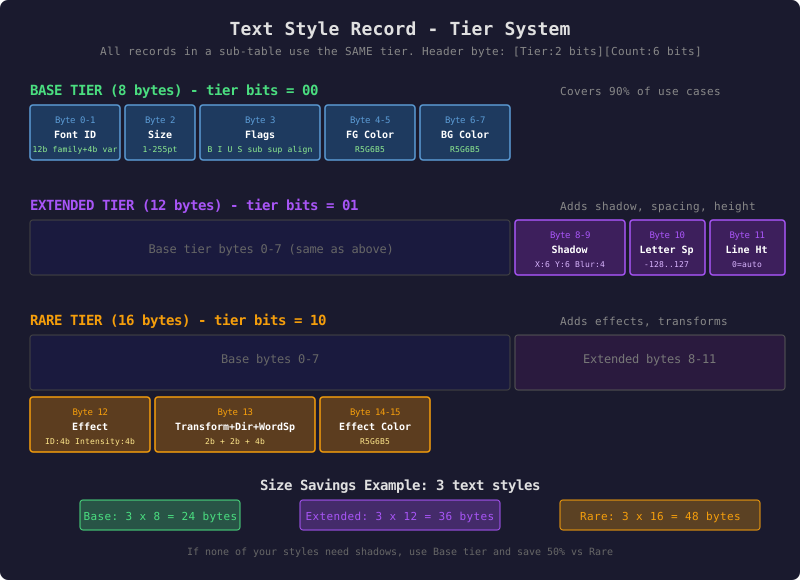
4. Sub-Table Order
Sub-tables appear in fixed order, separated by GS (0x1D):
| # | Sub-table | Tiered? |
|---|---|---|
| 1 | Container Background | Yes |
| 2 | Container Border | No |
| 3 | Container Spacing | No |
| 4 | Container Shadow | No |
| 5 | Container Composite | No |
| 6 | Text Styles | Yes |
| 7 | Font Effects | No |
| 8 | Nav Bar Styles | No |
| 9 | Table Styles | No |
| 10 | Image Definitions | No |
| 11 | Frame Definitions | No |
| 12 | Forms (reserved Phase III) | — |
Empty sub-table = bare GS (parsers also accept header with count 0).
5. Packed Records (no RS)
sub-table := GS [Header:1] [record × count]
record_ptr(i) = table_start + 1 + i * record_size(tier)
There is no RS between fixed-size style records. RS is reserved for table rows in the Text section only.
6. Record Formats (normative byte layouts)
Record sizes (unchanged):
| Type | Base | Extended | Rare |
|---|---|---|---|
| Background | 6 B | 12 B | 20 B |
| Border | 9 B | — | — |
| Spacing | 4 B | — | — |
| Shadow | 4 B | — | — |
| Composite | 5 B | — | — |
| Text Style | 8 B | 12 B | 16 B |
| Font Effect | 4 B | — | — |
| Nav Bar | 12 B | — | — |
| Table | 6 B | — | — |
| Image Definition | 8 B | — | — |
| Frame Definition | 8 B | — | — |
The per-byte layouts below are normative (completed 2026-07-18; they finalize the layouts the prior revision deferred to "prior Phase II detail"). Conventions: all multi-byte integers little-endian; all colors R5G6B5 or transparency codes per 08-Color-System; extended/rare tiers extend the smaller tier without moving its fields; every byte marked reserved MUST be written 0 and ignored on read. Optional style-index reference fields use 255 = no reference (valid record indexes are 0–62; 255 never collides).
6.1 Text Style (tiers 8 / 12 / 16 B)
| Byte | Tier | Field |
|---|---|---|
| 0–1 | base | FontID (u16 LE) per 09-Font-System §2: bits 0–11 = font family index (0 default, 1–2000 standard table, 2001–3999 reserved, 4000–4094 custom via FontID 4000+k → ResourceID k type 4, 4095 error/unknown); bits 12–15 = sub-variant hints (09 §2B). Bold/italic remain in the flags byte, never separate family IDs (ruling R02); unknown family → default font + warn. |
| 2 | base | Font size in points; 0 = inherit/default. |
| 3 | base | Flags: bit0 bold, bit1 italic, bit2 underline, bit3 strikethrough, bit4 subscript, bit5 superscript, bits6–7 alignment (0 left, 1 center, 2 right, 3 justify). |
| 4–5 | base | Foreground color (R5G6B5 or transparency code). |
| 6–7 | base | Background color (R5G6B5 or transparency code). |
| 8–9 | extended | Text shadow, packed u16 LE: bits0–5 X offset (signed 6-bit, −32..31 px), bits6–11 Y offset (signed 6-bit), bits12–15 blur (0–15). 0x0000 = no shadow. Same packing as Shadow record bytes 2–3. |
| 10 | extended | Letter spacing, signed int8 in 0.1 em units; 0 = normal. |
| 11 | extended | Line height: 0 = auto; else value ÷ 10 (e.g. 15 = 1.5). |
| 12 | rare | Low nibble: effect ID (§6.7 registry); high nibble: intensity 0–15. |
| 13 | rare | bits0–1 text transform (0 none, 1 UPPERCASE, 2 lowercase, 3 Capitalize); bits2–3 direction (0 auto, 1 LTR, 2 RTL, 3 reserved); bits4–7 word spacing 0–15 in 0.1 em added. |
| 14–15 | rare | Effect color (R5G6B5; used by glow/shadow/gradient effects). |
6.2 Background (tiers 6 / 12 / 20 B)
| Byte | Tier | Field |
|---|---|---|
| 0–1 | base | Background color (R5G6B5 or transparency code). With a gradient, this is gradient color 1. |
| 2–3 | base | Background image: built-in/background image ID (u16 LE), 0 = none. |
| 4 | base | Color opacity 0–255. |
| 5 | base | Image flags: bit0 repeat-x, bit1 repeat-y, bit2 fixed, bit3 cover, bit4 contain, bits5–7 reserved. |
| 6–7 | extended | Gradient color 2 (present iff gradient type ≠ 0). |
| 8 | extended | Gradient type: 0 none, 1 linear, 2 radial, 3–255 reserved. |
| 9 | extended | Gradient angle for linear: value × 360/256 degrees (0 = to-top, clockwise). Radial: 0. |
| 10 | extended | Position of color-2 stop, 0–255 = 0–100%. |
| 11 | extended | Reserved (0). |
| 12–13 | rare | Gradient color 3 (stop 3), or 0 if unused. |
| 14–15 | rare | Gradient color 4 (stop 4), or 0 if unused. |
| 16 | rare | Position of color-3 stop, 0–255 = 0–100% (must be > byte 10 when used). |
| 17 | rare | Position of color-4 stop, 0–255 = 0–100% (must be > byte 16 when used). |
| 18–19 | rare | Reserved (0). |
6.3 Border (9 B)
| Byte | Field |
|---|---|
| 0–1 | Border color (R5G6B5). |
| 2–3 | Thickness nibbles in px: byte 2 = top (high nibble) | right (low); byte 3 = bottom (high) | left (low). 0–15 px each. |
| 4–5 | Outside-of-border color (R5G6B5 or transparency code) — position per 08-Color-System §5. |
| 6–8 | Corner radii, four 6-bit values packed LSB-first across the 24 bits (bits 0–5 top-left, 6–11 top-right, 12–17 bottom-right, 18–23 bottom-left); percent ≈ round(value × 50 / 63) of the shorter container side. |
Line style is solid in Phase II; dashed/dotted are reserved for a future tier.
6.4 Spacing (4 B)
| Byte | Field |
|---|---|
| 0–1 | Margins: byte 0 = top (high nibble) | right (low); byte 1 = bottom (high) | left (low). |
| 2–3 | Padding, same packing as margins. |
Nibble semantics: 0 = explicit zero; 15 = inherit-from-left (the nibble to its left in the same byte pair order top→right→bottom→left; top inheriting = inherit from default); 1–14 = value × 4 px (4–56 px).
6.5 Shadow (4 B)
| Byte | Field |
|---|---|
| 0–1 | Shadow color (R5G6B5). |
| 2–3 | Packed u16 LE: bits0–5 X offset (signed 6-bit px), bits6–11 Y offset (signed 6-bit px), bits12–15 blur 0–15. Same packing as Text extended bytes 8–9. |
6.6 Composite (5 B)
| Byte | Field |
|---|---|
| 0 | Background style index (255 = none). |
| 1 | Border style index (255 = none). |
| 2 | Spacing style index (255 = none). |
| 3 | Shadow style index (255 = none). |
| 4 | bits0–1 overflow (0 visible, 1 hidden, 2 scroll, 3 reserved); bits2–7 layer_id (§7 registry). |
6.7 Font Effect (4 B) and effect registry
| Byte | Field |
|---|---|
| 0 | Effect ID (registry below). |
| 1 | Intensity 0–255. |
| 2 | Parameter A (effect-specific; 0 = default). |
| 3 | Parameter B (effect-specific; 0 = default). |
Effect IDs: 0 none · 1 drop shadow · 2 outer glow · 3 pulsing glow · 4 linear gradient · 5 multi-gradient · 6 outline/stroke · 7 emboss/bevel · 8 glitter · 9 flames · 10 neon · 11 3D extrude · 12 reflection · 13 frosted glass · 14 metallic · 15 custom (deterministic parameters via this sub-table — never AI; AI styling has AI_PROMPT). Animated effects render a static representative frame outside the editor detail panel; reduced-motion preferences always win. Text rare byte 12 references effects by the 4-bit ID. The Font Effect sub-table is keyed by Effect ID: at most one record per Effect ID; a second record with the same ID makes the Styles section invalid (strict-parse reject). A Text style referencing an effect with no matching Font Effect record uses that effect's deterministic defaults (intensity from Text rare byte 12; parameters 0).
6.8 Nav Bar (12 B)
| Byte | Field |
|---|---|
| 0 | Item text style index. |
| 1 | Active-item text style index (255 = same as items). |
| 2 | Hover-item text style index (255 = same as items; declarative only in Phase II). |
| 3 | Bar background style index (255 = none). |
| 4 | Bar border style index (255 = none). |
| 5 | Bar spacing style index (255 = none). |
| 6 | Collapse breakpoint: 0 = never collapse; else value × 8 px viewport width below which the bar collapses to a menu. |
| 7 | Flags: bit0 orientation (0 horizontal, 1 vertical); bits1–2 item mode (0 text+icon, 1 text only, 2 icon only, 3 reserved); bits3–4 alignment (0 start, 1 center, 2 end, 3 space-between); bits5–7 reserved. |
| 8–11 | Reserved (0). |
6.9 Table (6 B)
| Byte | Field |
|---|---|
| 0 | Header-row text style index (255 = body style). |
| 1 | Body text style index. |
| 2 | Grid border style index (255 = none). |
| 3 | Alternate-row background style index (255 = no striping). |
| 4 | Cell spacing style index (255 = default padding). |
| 5 | Flags: bit0 first row is header, bit1 row stripes on, bit2 column rules on, bit3 row rules on, bits4–7 reserved. |
6.10 Image Definition (8 B)
| Byte | Field |
|---|---|
| 0 | Source type: 0 document resource, 1 built-in image, 2 AI-generated (reserved; advisory only), 3–255 reserved. |
| 1 | Source ID (ResourceID for type 0; built-in ID for type 1). |
| 2–3 | Display width, u16 LE px; 0 = natural. |
| 4–5 | Display height, u16 LE px; 0 = natural. Width/height are always present so a client that skipped Resources can reserve placeholder space (or reflow — client's choice, ruling D05c). |
| 6 | Fit: 0 contain, 1 cover, 2 stretch, 3 tile, 4–255 reserved. |
| 7 | Border style index (255 = none). |
6.11 Frame Definition (8 B)
| Byte | Field |
|---|---|
| 0 | Source type: 0 document resource (embedded CBDF), 1 QWeb ID (reserved Phase III), 2–255 reserved. |
| 1 | Source ID. |
| 2–3 | Frame width, u16 LE px; 0 = auto. |
| 4–5 | Frame height, u16 LE px; 0 = auto. |
| 6 | Sandbox bits (default 0 = fully sandboxed): bit0 allow internal scrolling, bit1 allow links, bit2 allow framed resources, bit3 allow nested frames, bits4–7 reserved. Framed content can never execute Logic in Phase II. |
| 7 | Border style index (255 = none). |
General notes: Hover/event fields are declarative appearance only in Phase II (actions = Phase III Logic). Decoders MUST accept any record whose reserved fields are non-zero (ignore them) but encoders MUST write zeros — reserved bytes are the compatibility headroom of each record.
7. Layer Registry (composite layer_id)
| ID | Name | Phase II behavior |
|---|---|---|
| 0 | Background | Behind everything |
| 1 | Content | Default flow |
| 2–7 | Overlays | Stack by ID |
| 8 | Disclaimer | Pinned after content |
| 9 | Debug | Client debug view only |
| 10 | Modal | Parsed; not auto-shown until Logic |
| 11 | Alert | Same as Modal in Phase II |
| 12–62 | Reserved | Treat as content overlays |
| 63 | HTML/foreign | Reserved Phase III |
8. Page Background
Immediately after LayoutID, before the first GS: optional single BG record for the page (layer 0). If the next byte is GS, page background is default/transparent.
9. Minimum Styles Section
Length = 14 (0x0E 00 00 00)
LayoutID = 0x0000
GS × 12 (empty sub-tables)
Plus outer FS before the length when framed in the document.
10. Default Style Sets
Meta key 32: 0 = explicit styles; 1 = client default theme (section may hold deltas by index); 2–255 = named style sets (open registry). User themes override rendering locally but never redefine a named set ID.
11. Future / Post-Phase-II Container Background Extensions (non-normative)
Status: exploratory. NOT part of Phase II. Nothing here is implemented, encoded, or decoded today. This section records candidate future styling for containers (panels and other regions that hold text, images, tables, and nav). It reserves design intent so the wire format leaves room for it: the Background record (§6.2) still has reserved bytes 11 and 18–19 and unused tiers, the Composite record (§6.6) is 5 B with obvious extension room, and every decoder already ignores non-zero reserved bytes (§6 general notes) — so any of the below can be added later as an extended/rare tier without breaking existing documents. These are capabilities, not committed byte layouts; exact bytes are assigned when (and if) a feature is scheduled.
11.1 Container transparency ("glass")
Let a container background be semi-transparent so content painted behind the panel shows through — a frosted/glass panel over the page background or a lower layer. The Background record already carries a color opacity (§6.2 byte 4); this extends the idea to the container's whole background fill (color + image + gradient composited), i.e. a panel-level alpha applied to the composited background before content is drawn over it. Interacts with the layer system (§7): a transparent layer-1 panel reveals layer-0 (page background). Candidate home: a Composite-record extended byte (container background alpha 0–255), or a Background rare byte. Renderer note: correct only with back-to-front layer compositing; the SDL_Renderer fallback may approximate (flatten to the page background) — permitted under the optional-feature model.
11.2 Backdrop blur
When a container is transparent (§11.1), optionally blur what is behind it (a "frosted glass" backdrop, distinct from the text-only frosted glass font effect ID 13 in §6.7). A blur radius (e.g. 0–15, matching the 4-bit blur fields already used by Shadow §6.5 and Text-shadow §6.1) would sample the already-composited content behind the panel and Gaussian-blur it before the panel's own (semi-transparent) fill is applied. Candidate home: a Composite extended byte (backdrop-blur radius), gated on the container being transparent. Renderer note: this is a GPU-pipeline feature — it needs a fragment-shader pass sampling the framebuffer/prior render target, so it depends on the deferred SDL_GPU renderer path (see 00-Overview / master-plan §3); the SDL_Renderer fallback would omit blur (transparent-but-unblurred) with no data loss. Security: blur only samples already-rendered in-document content — never anything outside the document surface.
11.3 Animated container backgrounds
Idea parked for the future. Allow a container's background image (§6.2 background image / gradient) to animate: the whole background image could scroll (pan, e.g. a slow parallax drift), zoom (Ken-Burns-style scale over time), and/or rotate behind the container's content, with the content on top held still. This parallels the animated font effects (§6.7 — pulsing glow, flames, neon), which likewise render a static representative frame outside the editor and honor reduced-motion. A future encoding might add an animation descriptor to the Background record (motion type: none/scroll/zoom/rotate/combination; direction/axis; speed; loop mode) in a new rare/extended tier. Same universal rules would apply: reduced-motion preferences always win (static representative frame when motion is suppressed), animation is an optional feature (fallback renders the first frame), and it is declarative appearance only (no scripting; Phase III Logic remains fenced). GPU-pipeline feature, like §11.2.
These three are complementary: 11.1 (transparency) is the prerequisite for 11.2 (backdrop blur), and 11.3 (animation) is independent and the largest — all three are post-Phase-II and most naturally land after the SDL_GPU renderer and MSDF work exist. Recorded here at author request (2026-07-19) so the design intent and the reserved wire headroom are captured before the records are frozen.