
CBDF Specification: Color System
Version 1.1 (Phase II)Document: 08-Color-System • Date: 2026-07-13
1. Overview
CBDF uses a 16-bit color system based on the R5G6B5 (RGB565) format. This reduces every color from 3 bytes (24-bit RGB) or 7 bytes (CSS #RRGGBB) to just 2 bytes, while providing 65,536 distinct colors -- sufficient for document styling.
Five color codes are reserved for transparency levels, reducing the usable color count to 65,531.
2. R5G6B5 Encoding
Each color is stored as a 16-bit unsigned integer (2 bytes, little-endian).
Bit layout (MSB to LSB):
| Bits | Channel | Range |
|---|---|---|
| 15-11 | Red | 5 bits (0-31) |
| 10-5 | Green | 6 bits (0-63) |
| 4-0 | Blue | 5 bits (0-31) |
Byte layout (little-endian storage):
Byte 0 (low):  GGGBBBBB  (lower 3 bits of Green + all 5 bits of Blue)
Byte 1 (high): RRRRRGGG  (all 5 bits of Red + upper 3 bits of Green)
Conversion to 8-bit RGB:
R8 = round(R5 * 255 / 31)
G8 = round(G6 * 255 / 63)
B8 = round(B5 * 255 / 31)
Conversion from 8-bit RGB:
R5 = round(R8 * 31 / 255)
G6 = round(G8 * 63 / 255)
B5 = round(B8 * 31 / 255)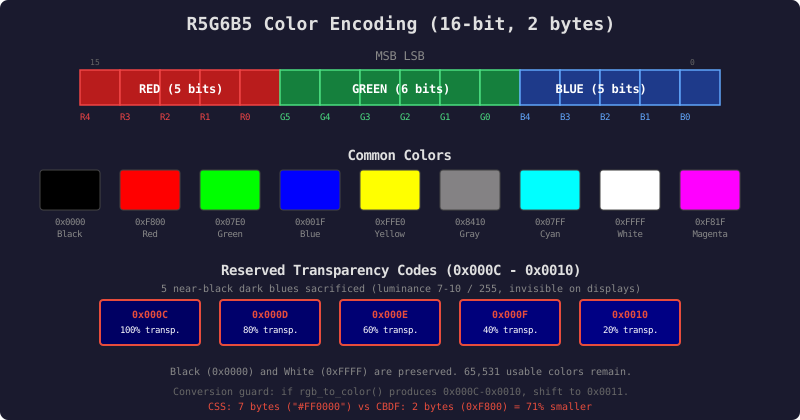
Click diagram to open full size in new tab
3. Reference Colors
| Color | R5G6B5 Hex | R5 | G6 | B5 | RGB8 |
|---|---|---|---|---|---|
| Black | 0x0000 | 0 | 0 | 0 | (0, 0, 0) |
| White | 0xFFFF | 31 | 63 | 31 | (255, 255, 255) |
| Pure Red | 0xF800 | 31 | 0 | 0 | (255, 0, 0) |
| Pure Green | 0x07E0 | 0 | 63 | 0 | (0, 255, 0) |
| Pure Blue | 0x001F | 0 | 0 | 31 | (0, 0, 255) |
| Mid Gray | 0x8410 | 16 | 32 | 16 | (132, 130, 132) |
| Dark Gray | 0x4208 | 8 | 16 | 8 | (66, 65, 66) |
| Light Gray | 0xC618 | 24 | 48 | 24 | (198, 194, 198) |
| Yellow | 0xFFE0 | 31 | 63 | 0 | (255, 255, 0) |
| Cyan | 0x07FF | 0 | 63 | 31 | (0, 255, 255) |
| Magenta | 0xF81F | 31 | 0 | 31 | (255, 0, 255) |
4. Reserved Transparency Codes
Five color codes are reserved to represent transparency levels. When a color field contains one of these codes, the renderer applies the specified transparency instead of drawing a color.
| Code | R5G6B5 Decode | Actual RGB8 | Transparency Level |
|---|---|---|---|
0x000C | R=0, G=0, B=12/31 | (0, 0, 99) | 100% transparent (invisible) |
0x000D | R=0, G=0, B=13/31 | (0, 0, 107) | 80% transparent (20% visible) |
0x000E | R=0, G=0, B=14/31 | (0, 0, 115) | 60% transparent (40% visible) |
0x000F | R=0, G=0, B=15/31 | (0, 0, 123) | 40% transparent (60% visible) |
0x0010 | R=0, G=0, B=16/31 | (0, 0, 132) | 20% transparent (80% visible) |
100% opaque = any non-reserved color code (the color itself, no transparency applied).
Selection Rationale
- These codes occupy a narrow band of very dark blues (luminance 7-10 out of 255) that are visually indistinguishable from each other on any real-world display.
- Human eyes have the fewest S-cones (blue photoreceptors), making blue the LEAST perceptible color channel, especially at low luminance.
- Pure black (
0x0000) and pure white (0xFFFF) are preserved. - Adjacent codes (
0x000B,0x0011) are available as fallbacks if a document author needs a color in this exact range. - Only 5 codes are sacrificed from the 65,536 color space (0.008% loss).
Important
These codes appear in STYLE RECORDS (within the Styles section), not in the text stream. There is no conflict with control character 0x0010 (DLE) because color values are never interpreted as control characters -- they occupy fixed byte positions within style records.
5. Usage in Style Records
Color fields appear in the following style record positions:
Text Style (base tier):
- Byte 4-5: Text foreground color (R5G6B5 or transparency code)
- Byte 6-7: Text background color (R5G6B5 or transparency code)
Text Style (rare tier):
- Byte 14-15: Effect color (R5G6B5, used by glow/shadow/gradient effects)
Container Background Style:
- Byte 0-1: Background color (R5G6B5 or transparency code)
- Byte 6-7: Gradient color 2 (if gradient type != none)
- Additional gradient color stops: 2 bytes each
Container Border Style:
- Byte 0-1: Border color (R5G6B5)
- Byte 4-5: Outside-of-border color (R5G6B5 or transparency code)
Container Shadow Style:
- Byte 0-1: Shadow color (R5G6B5)
Nav Bar Style:
- Various fields: Background, item background, hover color (all R5G6B5)
6. Transparency Behavior
When a renderer encounters a transparency code in a color field:
- a) FOREGROUND COLOR (text color): The text is rendered with the specified opacity over whatever is behind it.
- b) BACKGROUND COLOR: The background is transparent at the specified level, allowing elements behind it to show through.
- c) BORDER COLOR: The border is rendered at the specified opacity.
- d) OUTSIDE-OF-BORDER COLOR: The area outside the border uses the specified transparency.
0x000C(fully transparent) means the parent background shows through. - e) EFFECT COLOR: Font effects use the specified opacity. This allows semi-transparent glows, for example.
Compositing: Transparency is composited using standard alpha blending. The transparency percentage maps to an alpha value:
| Transparency | Alpha |
|---|---|
| 100% transparent | alpha = 0.0 |
| 80% transparent | alpha = 0.2 |
| 60% transparent | alpha = 0.4 |
| 40% transparent | alpha = 0.6 |
| 20% transparent | alpha = 0.8 |
| 0% transparent | alpha = 1.0 (any normal color code) |
7. C Implementation Notes
All transparency range checks MUST use named constants, not magic numbers.
#define CBDF_TRANSPARENT_FIRST  0x000C  /* 100% transparent */
#define CBDF_TRANSPARENT_LAST   0x0010  /* 20% transparent  */
#define CBDF_TRANSPARENT_COUNT  5
#define CBDF_TRANSPARENT_SAFE   0x0011  /* nearest non-reserved code */
Detecting transparency codes:
static inline int cbdf_color_is_transparent(uint16_t color) {
    return (color >= CBDF_TRANSPARENT_FIRST
         && color <= CBDF_TRANSPARENT_LAST);
}
Getting alpha value (0.0 to 1.0):
static inline float cbdf_color_alpha(uint16_t color) {
    if (!cbdf_color_is_transparent(color)) return 1.0f;
    /* FIRST=0.0, FIRST+1=0.2, FIRST+2=0.4, FIRST+3=0.6, FIRST+4=0.8 */
    return (color - CBDF_TRANSPARENT_FIRST) * 0.2f;
}
Converting R5G6B5 to 8-bit RGB:
static inline void cbdf_color_to_rgb(uint16_t c, uint8_t *r,
                                      uint8_t *g, uint8_t *b) {
    *r = ((c >> 11) & 0x1F) * 255 / 31;
    *g = ((c >> 5) & 0x3F) * 255 / 63;
    *b = (c & 0x1F) * 255 / 31;
}
Converting 8-bit RGB to R5G6B5:
static inline uint16_t cbdf_rgb_to_color(uint8_t r, uint8_t g,
                                          uint8_t b) {
    uint16_t c = ((uint16_t)(r * 31 / 255) << 11)
               | ((uint16_t)(g * 63 / 255) << 5)
               | (uint16_t)(b * 31 / 255);
    /* Avoid accidentally producing a transparency code */
    if (cbdf_color_is_transparent(c)) c = CBDF_TRANSPARENT_SAFE;
    return c;
}
Important
The rgb_to_color function must check whether the converted value accidentally falls in the transparency range. If it does, it shifts to CBDF_TRANSPARENT_SAFE (the nearest non-reserved code). This prevents very dark blues from being misinterpreted as transparency.