
CBDF Specification: Layout Catalogue
Version 1.0 (Phase II starter)Document: 10-Layout-Catalogue • Date: 2026-07-18
1. Purpose
The layout catalogue tells people which page skeleton to pick and tells encoders which pane is which index when writing CBDF. The wire carries only a uint16 LayoutID; geometry and pane tables live in the client catalogue (same idea as the font table).
Machine file (download / ship with clients):
layouts/cbdf-layout-catalog-v1.json— full registrylayouts/NAMED-LAYOUTS.md— human index of named desktop layoutslayouts/README.md— encoder notes
2. Wire field
Styles section payload begins with:
[LayoutID: 2 bytes little-endian]Example: named layout email-header-footer has id 257 (0x0101) → bytes 01 01.
3. ID ranges
| Range | Count | Meaning |
|---|---|---|
0x0000–0x00FF | 256 | Legacy compatibility: low byte = old 1-byte panel/col/row bitfield |
0x0100–0x0131 | 50 | Named desktop starters (blog, dashboard, shop, email, …) |
0x0200–0x02FF | 256 | Mobile stacks for each legacy id |
0x0300–0x0331 | 50 | Mobile stacks for each named desktop |
0x0400+ | — | Reserved for catalogue growth |
Starter set size: 612 layout records (256+256 legacy pairs + 50+50 named pairs). Unique desktop skeletons: 256 legacy + 50 named = 306 (within “up to 255 named unique” spirit for the curated set; legacy fills the full byte).
4. Pane index table (canonical rule)
Unless a layout’s catalogue entry overrides the order, panes are indexed:
- Header (if present)
- Left aside (if present)
- Main cells, row-major (left→right, top→bottom)
- Right aside (if present)
- Footer (if present)
- Overlay (modal/alert island — always last if present)
Encoders open STYLE_CONTAINER for indices 0 .. pane_count-1 in ascending order. See each layout’s panes[] in the JSON for the authoritative list.
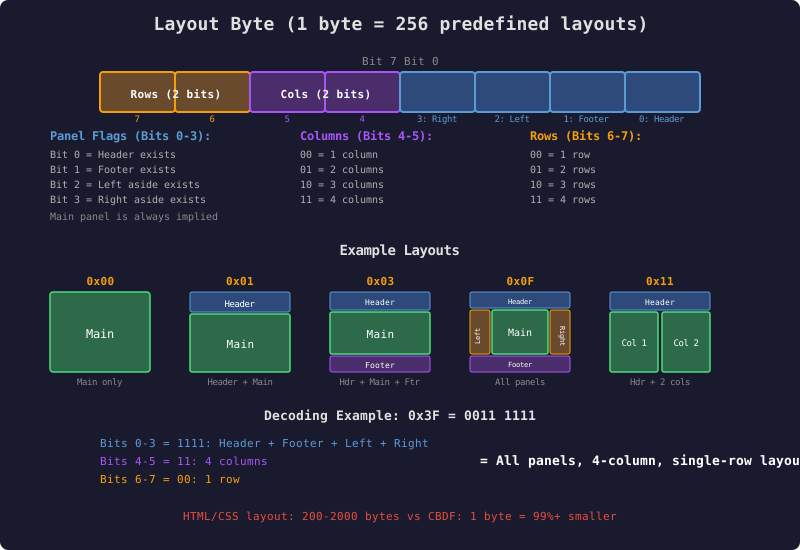
Legacy bitfield used when LayoutID is in 0x0000–0x00FF
5. Mobile / responsive pairing
Every desktop layout has a pair.mobile_layout_id. Mobile layouts re-stack panes to a single column:
header → main cells (row-major) → left → right → footer → overlayDefault breakpoint: 768 CSS px (default_mobile_breakpoint_px in the JSON). Clients MAY:
- Keep the desktop LayoutID on the wire and switch rendering to the paired mobile id at the breakpoint, or
- Encode a mobile-only document using the mobile LayoutID directly.
Side rails become stacked sections (not overlapping columns). Full-height flags are cleared on mobile stacks.
6. Navigation bars
Nav is content inside a pane, not a separate layout bit.
| Field (JSON) | Meaning |
|---|---|
nav.placement | none | header | left | right | footer |
nav.pane_index | Which pane hosts the nav (matches a pane with nav_host: true) |
nav.orientation | horizontal (typical header) or vertical (typical left rail) |
nav.item_block_type | Always 2 = CBDF ITEM_BLOCK nav |
nav.mobile_collapse | hamburger_header | drawer_left | bottom_tabs | stack | hidden |
6A. Text encoding for a nav bar
[STYLE_CONTAINER pane_index]     ; nav host pane
  [ITEM_BLOCK 0x02 nav_style_index]
    [LINK_START …] Home [LINK_END]
    US
    [LINK_START …] About [LINK_END]
    US
    [LINK_START …] Contact [LINK_END]
  [BLOCK_END]
[BLOCK_END]
nav_style_index references the Nav Bar Styles sub-table in Styles (orientation, colors, hover, collapse breakpoint, icon/text mode).
6B. Recommended host by layout type
- Marketing / email / blog: horizontal nav in header (collapse: hamburger).
- Docs / admin / dashboard: vertical nav in left (collapse: drawer).
- Mobile app shell: nav in footer as bottom tabs.
- Plain email body:
nav.placement = none.
7. Named desktop starters (summary)
Full pane tables: NAMED-LAYOUTS.md. Categories include:
- email / qmail — simple body, header/footer, newsletter columns, receipt
- blog / docs — left or right sidebar, full-height docs nav, TOC rail
- dashboard / app — left rail, inbox list+detail, settings, kanban, map+tools
- landing / marketing — hero, split-screen, pricing 3-col, contact split
- ecommerce — filters + products, product detail split
- grid / gallery — 2×2, 3×2, 3-col, 4-col, portfolio
- overlay — center modal, auth card
- document — invoice, report cover/body, legal long-form
| Hex | Slug | Title |
|---|---|---|
| 0x0100 | email-simple | Simple single column |
| 0x0101 | email-header-footer | Email with header and footer |
| 0x0103 | blog-right-sidebar | Blog / docs with right sidebar |
| 0x0104 | blog-left-sidebar | Blog / docs with left sidebar |
| 0x0106 | dashboard-left-rail | Dashboard with full-height left rail |
| 0x0109 | split-screen-2 | Split screen two columns |
| 0x010C | grid-2x2 | 2×2 main grid |
| 0x0110 | shop-filters-left | Shop with left filters |
| 0x0118 | modal-center | Main with center modal overlay |
| 0x0122 | holy-grail | Holy grail (H L M R F) |
| 0x012D | inbox-list-detail | Inbox list + detail |
| … | See NAMED-LAYOUTS.md for all 50 | |
8. JSON schema (layout object)
{
  "id": 259,
  "hex": "0x0103",
  "slug": "blog-right-sidebar",
  "title": "Blog / docs with right sidebar",
  "category": "blog",
  "viewport": "desktop",
  "pane_count": 4,
  "panes": [
    { "index": 0, "role": "header", "nav_host": true, ... },
    { "index": 1, "role": "main", "grid_col": 0, "grid_row": 0, ... },
    { "index": 2, "role": "right", ... },
    { "index": 3, "role": "footer", ... }
  ],
  "nav": {
    "placement": "header",
    "orientation": "horizontal",
    "pane_index": 0,
    "item_block_type": 2,
    "mobile_collapse": "hamburger_header"
  },
  "pair": { "mobile_layout_id": 771 },
  "ascii_preview": "...",
  "use_cases": ["blog post", "documentation"]
}
9. Encoder checklist
- Choose layout by slug or id from the catalogue.
- Write
LayoutIDas uint16 LE in Styles. - For each pane index in order, open
STYLE_CONTAINERwith the composite style for that pane. - Put nav
ITEM_BLOCK type=2in thenav_hostpane. - Main multi-cell grids: emit one container per main cell in row-major order as listed.
- Optional: set Required Features bit 11 if LayoutID ≥ 0x0100 and fidelity matters.
10. Legacy bitfield reference
For LayoutID 0x00XX, decode low byte:
- Bit 0 header, bit 1 footer, bit 2 left, bit 3 right
- Bits 4–5 columns (1–4), bits 6–7 rows (1–4)
- Main always present; pane indices follow the canonical rule
All 256 values are pre-expanded in the JSON so encoders need not re-implement the bitfield unless they want to.
11. Growth
New layouts get the next free id in 0x0100+ (desktop) and matching 0x0300+ mobile pair. Registry is append-only. Private experiments use 0xF000–0xFFFE and must not appear in interoperable mail without agreement.
12. Custom
The LayoutID space has room for 65,000+ layouts. If you would like to submit your own layout to the standard — and are willing to allow everyone to use it — we will charge $45 to add it to the standard catalogue.
New additions take some time to propagate, since clients ship with a local copy of the catalogue. However, we plan to list all layouts in the DRD (the directory service), so that when a client encounters a LayoutID that is not in its local cache, it can ask the directory for the entry. Once this is set up in Phase III, clients will receive new layouts instantly.
12A. How to describe your layout
A layout submission is one JSON layout object in the format defined in section 8 above — the same format every entry in cbdf-layout-catalog-v1.json uses. Copy an existing entry that is close to your idea (see NAMED-LAYOUTS.md for the human-readable index) and edit it. Your submission must include:
- name and slug — a short unique name (e.g.
recipe-card); - panes[] — every pane in canonical index order (section 4), each with its role (header / left / main cell / right / footer / overlay) and default geometry hints;
- nav — placement, host pane, orientation, and mobile collapse behavior (section 6), or
none; - mobile pair — the single-column stacking order for the paired mobile layout (section 5); we assign the paired mobile ID with your desktop ID;
- category — where it belongs in the picker (email, blog, shop, dashboard, …).
Do not pick your own LayoutID — IDs are assigned by the registry on acceptance. A sketch or screenshot of the intended result helps review but the JSON object is the submission.